


Se afișează postările cu eticheta gps. Afișați toate postările
Se afișează postările cu eticheta gps. Afișați toate postările
GPS Status & Toolbox PRO v5.0.102
Requirements: Android 4.0+
Overview: Display your GPS and sensor data: position and signal strength of satellites, accuracy, speed, acceleration, bearing.
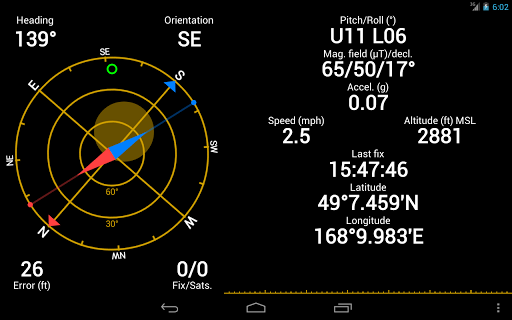
Displays GPS and sensor data: position and signal strength of satellites, accuracy, speed, acceleration, altitude, bearing, pitch, roll and battery state.
Tools included: compass with magnetic and true north, leveling tool, mark or share your location and navigate back later.
Keep your GPS fast: reset it or download A-GPS data regularly for faster fixes.
Visit the FAQ at: http://mobiwia.com/gpsstatus
GPS Status is 100% space proof. Try to spot the program in the video below
PRO features:
- show/store/edit multiple waypoints and use them on the Radar for navigation.
- pressure, rotation, temperature, humidity values (if supported by the device)
- removed ads
KNOWN FIRMWARE ISSUES (please do not report them):
- Samsung phones: Because of a firmware bug, they may report extreme battery consumption for GPS Status even if it is not running at all (other programs using sensors are affected too). This is harmless and no power is consumed! Just ignore it and let's hope that a future firmware upgrade will fix this on your phone.
- Droid 3: The initial Droid 3 firmware does not implement the satellite status API so you will not see the satellites and the signal strength bars. The rest of the features should work properly.
- Motorola phones: On some phones, turning your phone to airplane mode will turn off the GPS receiver, too. This is a hardware limitation.
- Droid Charge: Reports 0 altitude.
- LG Optimus: The phone cannot report the satellite SNR values correctly (all signal bars will be maxed out).
- Nexus One/S: With Andoid 2.3 it cannot report NMEA sentences. This means that the DOP/HDOP/VDOP values are not available.
What's New
- FIX: Screen orientation is now correctly calculated in landscape mode.
- FIX: Uses the ORIENTATION sensor for better compatibility.
- FIX: Pitch/roll is now working even on low-end devices without a magnetometer sensor.
- FIX: Use the * char to denote the ° ' and " character in the location edit dialog.
- NEW: New share template variables: %lat% and %lon%
- NEW: Compass is now working when speed is above 5km/h even on devices without a magnetometer sensor
- NEW: Translation updates.
Release info:
Unlocked Pro features in GPS Status & Toolbox!
This app has NO advertisements
More Info:
Download Instructions:
https://www.oboom.com/MKD79ZZ2
Mirror:
http://ul.to/8nac4hvs
http://www.tusfiles.net/we6vgcckgacx
READ MORE
Requirements: Android 4.0+
Overview: Display your GPS and sensor data: position and signal strength of satellites, accuracy, speed, acceleration, bearing.
Displays GPS and sensor data: position and signal strength of satellites, accuracy, speed, acceleration, altitude, bearing, pitch, roll and battery state.
Tools included: compass with magnetic and true north, leveling tool, mark or share your location and navigate back later.
Keep your GPS fast: reset it or download A-GPS data regularly for faster fixes.
Visit the FAQ at: http://mobiwia.com/gpsstatus
GPS Status is 100% space proof. Try to spot the program in the video below
PRO features:
- show/store/edit multiple waypoints and use them on the Radar for navigation.
- pressure, rotation, temperature, humidity values (if supported by the device)
- removed ads
KNOWN FIRMWARE ISSUES (please do not report them):
- Samsung phones: Because of a firmware bug, they may report extreme battery consumption for GPS Status even if it is not running at all (other programs using sensors are affected too). This is harmless and no power is consumed! Just ignore it and let's hope that a future firmware upgrade will fix this on your phone.
- Droid 3: The initial Droid 3 firmware does not implement the satellite status API so you will not see the satellites and the signal strength bars. The rest of the features should work properly.
- Motorola phones: On some phones, turning your phone to airplane mode will turn off the GPS receiver, too. This is a hardware limitation.
- Droid Charge: Reports 0 altitude.
- LG Optimus: The phone cannot report the satellite SNR values correctly (all signal bars will be maxed out).
- Nexus One/S: With Andoid 2.3 it cannot report NMEA sentences. This means that the DOP/HDOP/VDOP values are not available.
What's New
- FIX: Screen orientation is now correctly calculated in landscape mode.
- FIX: Uses the ORIENTATION sensor for better compatibility.
- FIX: Pitch/roll is now working even on low-end devices without a magnetometer sensor.
- FIX: Use the * char to denote the ° ' and " character in the location edit dialog.
- NEW: New share template variables: %lat% and %lon%
- NEW: Compass is now working when speed is above 5km/h even on devices without a magnetometer sensor
- NEW: Translation updates.
Release info:
Unlocked Pro features in GPS Status & Toolbox!
This app has NO advertisements
More Info:
Code:
https://play.google.com/store/apps/details?id=com.eclipsim.gpsstatus2
Download Instructions:
https://www.oboom.com/MKD79ZZ2
Mirror:
http://ul.to/8nac4hvs
http://www.tusfiles.net/we6vgcckgacx
Fake GPS Location Spoofer v3.5
Requirements: 2.1 and up
Overview: Fake Gps location so you can post on Facebook ™, Twitter ™, Foursquare ™, Whatsapp ™, Google Maps ™, Navigation, Yelp ™, Navigon ™, TomTom ™ or any other app that uses your phone's locations. The app will overwrite your current location elegantly and the third party apps will think you are in Paris under the Eifel Tower or in New York on Times Square!

Rooted? Use it with some apps as root without mock locations :
1. Copy pkg.apk in /mnt/asec/ to SDCard and rename it 'com.incorprateapps.fakepgs-1.apk' and move it to system/app and then press on install via ES File Explorer and reboot. Make sure in ES File Explorer Root Explorer is enabled and Mount R/W is on RW!!!!
or Google how to move mnt/asec apps to system/app
No Allow Mock Locations required! DO NOT SEARCH IN data/app - paid apps are encrypted under /mnt/asec!! Contact us to assist you!
DISABLE WIFI LOCATION SETTINGS!!!!
IMPORTANT!!! Do not use System App Mover! Read below:
The System App Mover we suggested is causing Crashes - please DO NOT USE the System App Mover unless their developer fixes it - it causes the app to be renamed with its package name and the resources are missing. Please move the app manually from /mnt/asec as explained.
Prank your friends on Whatsapp, Twitter ™, Facebook ™ and Foursquare ™ into thinking you are travelling the world!
You just MUST share your location with your friends, but the phone is almost dead, can't locate you or the GPS accuracy is bad? No problem, use our app!
You can use the app with any other GPS positioning app or with our app Spoty Location Reminder.
How to use:
- Choose your faked location and press play and the app will insert the Fake GPS location into your android phone.
The app will insert the fake gps position on Facebook ™, Foursquare ™, Google Maps, Whatsapp, Navigation, Navigon ™, Tomtom ™ or any other app
Permissions:
- Internet - to display the map view
- Access Coarse and Fine Location - to fake your current location
- Write settings - to try and modify the mock location settings, works on some phones only.
- Allow mock locations under Developer settings (Applications). Jelly Bean users need to enable Developer Settings by going to Settings- About and pressing 7 times on the Build before they can change the "Allow mock locations"
- Root users do not need allow mock locations, but MUST move app to /system/app (read above tutorial).
Make sure to check our other apps:
✔ Walk and Text Transparent Screen (Texting while walking is dangerous - not any more!)
✔ Call Guard (block calls and sms or mms)
✔ Talking Caller ID, talking SMS ID
✔ Spoty (Location Reminder, Call Blocker, SMS Sender, Profile Changer)
✔ Battery Percentage Alarm Icon (See the Percentage of the Battery,
✔ Emergency (Panic Button, sending your location in a case of emergency)
✔ Amazon Free App of the Day Notifier
✔ Safe Drive (call blocker and sms blocker while driving)
✔ Hide Caller ID
✔ Whip It App from The Big Bang Theory (TBBT)
✔ Total control (Shake2Call)
✔ Teleport Transporter App
What's New
Always uninstall before reinstall of updates if system app!
- Crashes caused by System/app mover- move pkg.apk manually from mnt/asec/appfolder to sdcard and press Install(Es File explorer) and then move to system/app or system/priv-app on 4.4
3.1
-fixes for gps fix loss after disabling on root
-New setting - update interval user adjustable for better hacking on certain apps...
old:
- New setting-move around location in a radius
- No mock locations required if used on root and used as system/app
This app has NO advertisements
More Info:
Download Instructions: Released by yuki918
https://www.tusfiles.net/0v643e78axzk
Mirror:
http://unlimitzone.com/wisfz9weachf/FakeGPS_3.5.apk.html
READ MORE
Requirements: 2.1 and up
Overview: Fake Gps location so you can post on Facebook ™, Twitter ™, Foursquare ™, Whatsapp ™, Google Maps ™, Navigation, Yelp ™, Navigon ™, TomTom ™ or any other app that uses your phone's locations. The app will overwrite your current location elegantly and the third party apps will think you are in Paris under the Eifel Tower or in New York on Times Square!
Rooted? Use it with some apps as root without mock locations :
1. Copy pkg.apk in /mnt/asec/ to SDCard and rename it 'com.incorprateapps.fakepgs-1.apk' and move it to system/app and then press on install via ES File Explorer and reboot. Make sure in ES File Explorer Root Explorer is enabled and Mount R/W is on RW!!!!
or Google how to move mnt/asec apps to system/app
No Allow Mock Locations required! DO NOT SEARCH IN data/app - paid apps are encrypted under /mnt/asec!! Contact us to assist you!
DISABLE WIFI LOCATION SETTINGS!!!!
IMPORTANT!!! Do not use System App Mover! Read below:
The System App Mover we suggested is causing Crashes - please DO NOT USE the System App Mover unless their developer fixes it - it causes the app to be renamed with its package name and the resources are missing. Please move the app manually from /mnt/asec as explained.
Prank your friends on Whatsapp, Twitter ™, Facebook ™ and Foursquare ™ into thinking you are travelling the world!
You just MUST share your location with your friends, but the phone is almost dead, can't locate you or the GPS accuracy is bad? No problem, use our app!
You can use the app with any other GPS positioning app or with our app Spoty Location Reminder.
How to use:
- Choose your faked location and press play and the app will insert the Fake GPS location into your android phone.
The app will insert the fake gps position on Facebook ™, Foursquare ™, Google Maps, Whatsapp, Navigation, Navigon ™, Tomtom ™ or any other app
Permissions:
- Internet - to display the map view
- Access Coarse and Fine Location - to fake your current location
- Write settings - to try and modify the mock location settings, works on some phones only.
- Allow mock locations under Developer settings (Applications). Jelly Bean users need to enable Developer Settings by going to Settings- About and pressing 7 times on the Build before they can change the "Allow mock locations"
- Root users do not need allow mock locations, but MUST move app to /system/app (read above tutorial).
Make sure to check our other apps:
✔ Walk and Text Transparent Screen (Texting while walking is dangerous - not any more!)
✔ Call Guard (block calls and sms or mms)
✔ Talking Caller ID, talking SMS ID
✔ Spoty (Location Reminder, Call Blocker, SMS Sender, Profile Changer)
✔ Battery Percentage Alarm Icon (See the Percentage of the Battery,
✔ Emergency (Panic Button, sending your location in a case of emergency)
✔ Amazon Free App of the Day Notifier
✔ Safe Drive (call blocker and sms blocker while driving)
✔ Hide Caller ID
✔ Whip It App from The Big Bang Theory (TBBT)
✔ Total control (Shake2Call)
✔ Teleport Transporter App
What's New
Always uninstall before reinstall of updates if system app!
- Crashes caused by System/app mover- move pkg.apk manually from mnt/asec/appfolder to sdcard and press Install(Es File explorer) and then move to system/app or system/priv-app on 4.4
3.1
-fixes for gps fix loss after disabling on root
-New setting - update interval user adjustable for better hacking on certain apps...
old:
- New setting-move around location in a radius
- No mock locations required if used on root and used as system/app
This app has NO advertisements
More Info:
Code:
https://play.google.com/store/apps/details?id=com.incorporateapps.fakegps
Download Instructions: Released by yuki918
https://www.tusfiles.net/0v643e78axzk
Mirror:
http://unlimitzone.com/wisfz9weachf/FakeGPS_3.5.apk.html
Sygic: GPS Navigation v13.4.1 Maps 2013.06
Requirements: 2.0.1+
Overview: THE MOST DOWNLOADED OFFLINE NAVIGATION APP IN THE WORLD!

HIGHLIGHTS
➤High quality TomTom maps stored on the phone
➤Works with GPS only, internet is not needed
➤Turn-by-Turn voice guided navigation
➤Spoken Street Names to focus on the road
➤Three Alternative Routes to choose from
➤Waypoints for places you want to visit
➤Dynamic Lane Guidance to know the right lane
➤Junction View to understand intersections
➤Speed Limit Display to protect your wallet
➤Speed Camera Warnings for Speedy Gonzales
_______________________________________
BENEFITS
➤Free Updates: maps, premium POI, speed cams
➤3D Cities & Landscape for easy orientation
_______________________________________
SAFETY AND USER COMFORT
➤Sharp Curve Warnings for added safety
➤Notification of Upcoming Speed Limit Change
➤Avoid Toll Roads on part or on entire route
➤Avoid Roadblocks, Motorways …
➤Pedestrian Navigation to walk and explore
➤Compass & Stopwatch for outdoor activities
_______________________________________
SYGIC PLACES
➤Exclusive POIs as free download in My Sygic
➤TripAdvisor, Booking.com & many more
_______________________________________
GREAT SEARCH
➤Google™ Local Search to find anything
➤Find and Navigate to
· Address
· Contact
· POI
· Postal code
· Intersection
· GPS coordinates
· Geo tagged photo
· Home
_______________________________________
APP THAT IS PERSONAL
➤Import of interesting locations - POIs
➤Customizable navigation screen
➤Road Incident Sharing with other drivers
➤SOS/Help to find assistance nearby
➤Customizable spoken warnings
➤Friends on the map
_______________________________________
COMPATIBLE TO THE MAX
➤Smooth Hardware Accelerated 3D rendering
➤Car Audio Integration – Bluetooth or cable
➤Graphics optimized for tablet & HD displays
This app has NO advertisements
More Info:
Download Instructions:
Apk v13.4.1+Base(22.12.2013)
http://uploaded.net/file/6126wne1
http://uploaded.net/file/c4zruqg0
Maps 2013.06 (Sdcard/Sygic/Maps)
EUROPE:
http://ul.to/zwrnounh Sygic Maps 2013.06.part01.rar (400,00 MB)
http://ul.to/q5j4cizb Sygic Maps 2013.06.part02.rar (400,00 MB)
http://ul.to/vmklnp3r Sygic Maps 2013.06.part03.rar (400,00 MB)
http://ul.to/zrkt9sh2 Sygic Maps 2013.06.part04.rar (400,00 MB)
http://ul.to/5kvcctku Sygic Maps 2013.06.part05.rar (400,00 MB)
http://ul.to/ton39841 Sygic Maps 2013.06.part06.rar (400,00 MB)
http://ul.to/7cd1428d Sygic Maps 2013.06.part07.rar (400,00 MB)
http://ul.to/cacbevtq Sygic Maps 2013.06.part08.rar (400,00 MB)
http://ul.to/9bzsrah4 Sygic Maps 2013.06.part09.rar (400,00 MB)
http://ul.to/tc307m6l Sygic Maps 2013.06.part10.rar (400,00 MB)
http://ul.to/yf5vr8pm Sygic Maps 2013.06.part11.rar (314,38 MB)
Download Apk and install
Download Base and copy folder in Sdcard
Download Map and copy folder in Sdcard/Sygic/Maps
READ MORE
Requirements: 2.0.1+
Overview: THE MOST DOWNLOADED OFFLINE NAVIGATION APP IN THE WORLD!
HIGHLIGHTS
➤High quality TomTom maps stored on the phone
➤Works with GPS only, internet is not needed
➤Turn-by-Turn voice guided navigation
➤Spoken Street Names to focus on the road
➤Three Alternative Routes to choose from
➤Waypoints for places you want to visit
➤Dynamic Lane Guidance to know the right lane
➤Junction View to understand intersections
➤Speed Limit Display to protect your wallet
➤Speed Camera Warnings for Speedy Gonzales
_______________________________________
BENEFITS
➤Free Updates: maps, premium POI, speed cams
➤3D Cities & Landscape for easy orientation
_______________________________________
SAFETY AND USER COMFORT
➤Sharp Curve Warnings for added safety
➤Notification of Upcoming Speed Limit Change
➤Avoid Toll Roads on part or on entire route
➤Avoid Roadblocks, Motorways …
➤Pedestrian Navigation to walk and explore
➤Compass & Stopwatch for outdoor activities
_______________________________________
SYGIC PLACES
➤Exclusive POIs as free download in My Sygic
➤TripAdvisor, Booking.com & many more
_______________________________________
GREAT SEARCH
➤Google™ Local Search to find anything
➤Find and Navigate to
· Address
· Contact
· POI
· Postal code
· Intersection
· GPS coordinates
· Geo tagged photo
· Home
_______________________________________
APP THAT IS PERSONAL
➤Import of interesting locations - POIs
➤Customizable navigation screen
➤Road Incident Sharing with other drivers
➤SOS/Help to find assistance nearby
➤Customizable spoken warnings
➤Friends on the map
_______________________________________
COMPATIBLE TO THE MAX
➤Smooth Hardware Accelerated 3D rendering
➤Car Audio Integration – Bluetooth or cable
➤Graphics optimized for tablet & HD displays
This app has NO advertisements
More Info:
Code:
https://play.google.com/store/apps/details?id=com.sygic.aura
Download Instructions:
Apk v13.4.1+Base(22.12.2013)
http://uploaded.net/file/6126wne1
http://uploaded.net/file/c4zruqg0
Maps 2013.06 (Sdcard/Sygic/Maps)
EUROPE:
http://ul.to/zwrnounh Sygic Maps 2013.06.part01.rar (400,00 MB)
http://ul.to/q5j4cizb Sygic Maps 2013.06.part02.rar (400,00 MB)
http://ul.to/vmklnp3r Sygic Maps 2013.06.part03.rar (400,00 MB)
http://ul.to/zrkt9sh2 Sygic Maps 2013.06.part04.rar (400,00 MB)
http://ul.to/5kvcctku Sygic Maps 2013.06.part05.rar (400,00 MB)
http://ul.to/ton39841 Sygic Maps 2013.06.part06.rar (400,00 MB)
http://ul.to/7cd1428d Sygic Maps 2013.06.part07.rar (400,00 MB)
http://ul.to/cacbevtq Sygic Maps 2013.06.part08.rar (400,00 MB)
http://ul.to/9bzsrah4 Sygic Maps 2013.06.part09.rar (400,00 MB)
http://ul.to/tc307m6l Sygic Maps 2013.06.part10.rar (400,00 MB)
http://ul.to/yf5vr8pm Sygic Maps 2013.06.part11.rar (314,38 MB)
Download Apk and install
Download Base and copy folder in Sdcard
Download Map and copy folder in Sdcard/Sygic/Maps
